Listed below are some examples of the issues relating to web cache (history):
- I’ve entered in my details but the screen is has a whirling symbol and is just hanging
- The sound notifications are not working
- I am available to chat but chats are not being assigned to me
- The switcher is not showing for me
These errors are caused by the web cache (history) impeding the connection.
Please clear down your browsing history every day before they log on to Freshdesk/freshchat or at the end of the day before leaving.
Attached a guide for anyone unsure of how to do this or instructions below:
- On Google Chrome in the top right hand corner click on the three dot icon then
select History & History again.
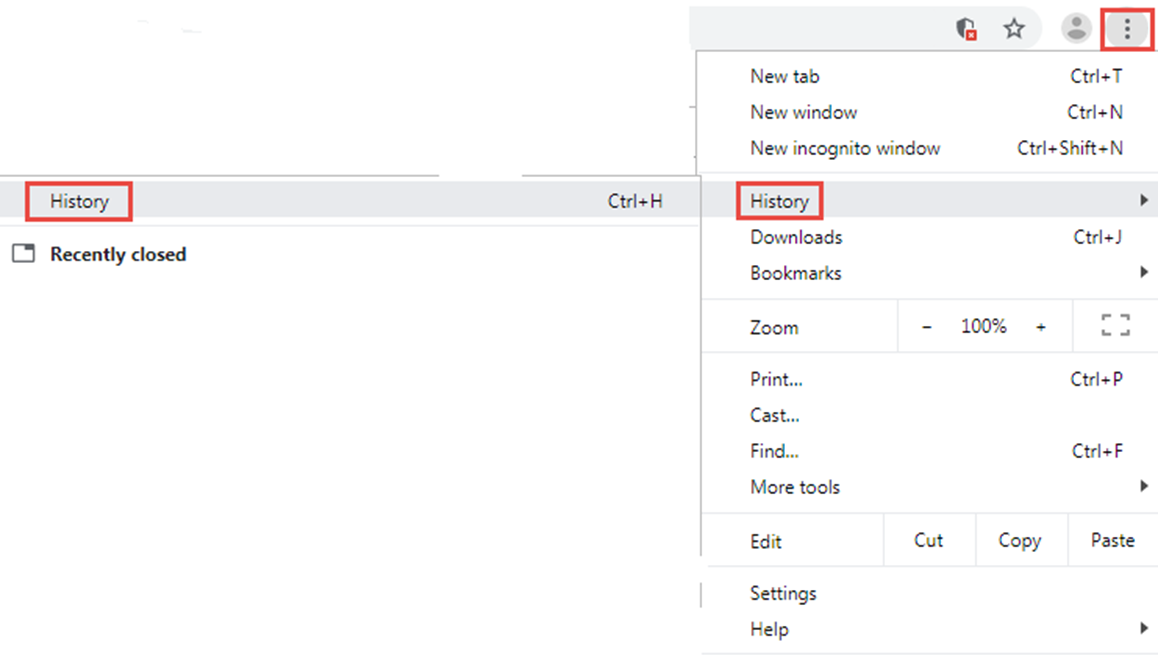
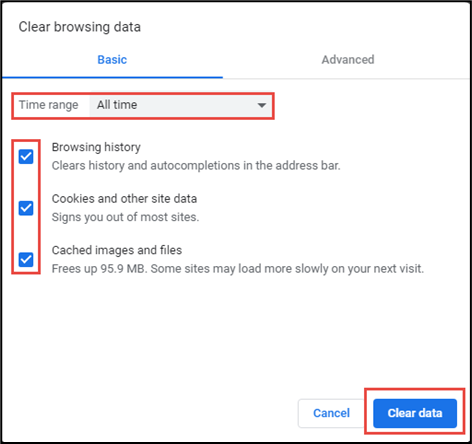
The below screen will appear and you will need to click on Clear browsing data.

Ensure that the time range on the below screen is All time and all boxes are ticked. Click on Clear data.
Was this article helpful?
That’s Great!
Thank you for your feedback
Sorry! We couldn't be helpful
Thank you for your feedback
Feedback sent
We appreciate your effort and will try to fix the article